
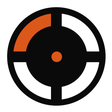
WHERE DO I SHOOT for Crosshair X for Windows
Static high-contrast crosshair preset for competitive FPS aiming
- Free
- 4.9
- V 1.0.0
Static high-contrast crosshair preset for competitive FPS aiming
WHERE DO I SHOOT for Crosshair X places a static, high-contrast reticle over any game, helping players keep a fixed aiming point despite weapon bloom or HUD changes. Created by bodaciousP as a community mod on mod.io, the preset integrates with the Crosshair X host application and offers one-click installation, cloud sync, and designer controls for color, size and opacity. It suits competitive FPS players and aim trainers who want a consistent external aiming reference across multiple Windows PCs.
What kind of mod this is and how it affects aim
The preset is a community-created crosshair designed for competitive aiming, using custom-engineered reticle geometry to clarify target acquisition. It renders externally through the overlay engine, which avoids modifying game files and reduces the risk of anti-cheat interference. Because it supplies a static point of reference, the preset keeps the same visual center regardless of in-game weapon bloom or HUD variations, which helps players seeking repeatable shot placement.
How installation and cross-device use work
Installation runs through mod.io with a single click or via the Crosshair X desktop application's Community/Explore tabs, and the mod supports one-click synchronization and cloud-based sync across Windows machines. The preset requires the Crosshair X host application and typically needs games to run in Windowed or Borderless Windowed mode. The asset footprint is lightweight, and the developer notes no measurable impact on FPS or game stability.
What to expect in customization and compatibility
Once imported into Crosshair X, you edit the preset in the Designer tab to change color, size, opacity and other visual properties, so users can tune visibility for different maps and lighting. The design emphasizes high visibility against varied environments, and because it is part of the official Crosshair X modding ecosystem, it integrates with the host app's overlay pipeline rather than injecting code into games.
Recommended for players who want a consistent external aiming reference
WHERE DO I SHOOT suits competitive players and aim trainers who prefer an externally rendered, highly visible reticle they can tweak across sessions and machines. Expect quick setup via mod.io and the Crosshair X app, low system overhead, and the ability to fine-tune visual properties. Players who need in-game file changes or fullscreen-exclusive overlays should consider whether an external overlay fits their setup.
Pros
- One-click installation through mod.io
- Cloud sync keeps the preset across Windows PCs
- Designer controls for color, size, opacity
- External rendering avoids modifying game files
Cons
- Requires the Crosshair X host application to run
- Best used in Windowed or Borderless Windowed mode
- No impact on games that force exclusive fullscreen overlay
WHERE DO I SHOOT for Crosshair X for Windows
- Free
- 4.9
- V 1.0.0
Top downloads

SPIDER LAB for Bonelab
Explore SPIDER LAB for Bonelab: A Unique Mod Experience
Hello for Incredibox
Engaging Mod for Incredibox Enthusiasts
Realistic GUN SOUNDS Custom gun sounds for GoreBox
Realistic GUN SOUNDS brings realistic firearm audio to GoreBox
Downtown for Incredibox
Explore the Vibrant World of Downtown for Incredibox
MASH BOX ONLY - Colony for BMX Streets
Explore BMX Streets with MASH BOX ONLY