
Redline Bulkhead Watch Face for Android
Split-dial industrial watch face with health readouts
- Free
- 4.4
- V 1.0
Split-dial industrial watch face with health readouts
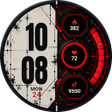
Splits the dial into two halves, pairing a distressed cream paper look with a riveted industrial bulkhead while showing stacked hours and minutes and live fitness data. Time Design LLC supplies this Wear OS personalization option for modern smartwatches, optimized for Wear OS 6+ and recent Samsung and Google hardware. Six color themes, a battery‑efficient Always-On Display, and integrated BPM, step count and calorie estimates make it suitable for users who want a bold, high-contrast mechanical style with readable data.
Visual design balances ornamental detail and legibility
The watch face combines a left "grunge paper" texture with a right metallic bulkhead, and uses condensed typography for the digital time, which presents stacked hours and minutes for quick glances. Six selectable color themes change accent frames, gauges, and icons, and three octagonal bulkhead frames display discrete data fields. The split-dial layout keeps decorative elements out of the central time area, which supports both 12-hour and 24-hour formats according to the phone's settings.
Fitness and system readouts integrate directly into the display
The watch face places Heart Rate (BPM), Step Count, and a calorie estimate into the three bulkhead frames, giving continuous access to core health metrics without opening separate apps. Full date output includes weekday abbreviations and the day number. The calorie figure is explicitly estimated from daily movement data, so the readouts reflect on-device sensor feeds and aggregated step totals rather than manual entry.
Optimized for modern Wear OS hardware and battery life
Compatibility targets Wear OS 6.0 and higher and lists specific devices such as Galaxy Watch Series 5–8 and Pixel Watch Series 2–4, which indicates testing on recent hardware. The Always-On Display mode renders time and date in white on a pure black background to reduce power draw, and the developer describes the design as battery-efficient to preserve runtime on OLED-based watches.
Setup and customization occur through standard watch controls
Theme selection uses the platform's long-press customize flow: users long-press the watch face and cycle through the six themes named Redline, Sodium, Acid, Coolant, Cryo, and Plasma. That method requires no companion phone steps for basic appearance changes, so daily adjustments happen from the device rather than a separate app interface.
Good fit for wearable owners who want bold mechanical styling
The watch face suits smartwatch owners who prefer an industrial or automotive look and need prominent health and date readouts in a high-contrast layout. It targets modern Wear OS devices and keeps configuration on-device, which matches users who want direct control from the watch. Those seeking minimalist, unadorned faces may find the split-dial aesthetic too decorative for everyday low-profile use.
Pros
- Per-monitor style: split-dial keeps time area clear while adding texture
- Six color themes configurable via long-press customize on the watch
- Three live frames show BPM, steps, and calorie estimates
- Battery-optimized Always-On Display uses white on black to save power
Cons
- Aesthetic is highly stylized and may not suit minimalists
- Calorie readout is an estimate derived from step data, not metabolic testing
- Customization beyond theme cycling requires the platform's built-in editor, not a separate settings app
Redline Bulkhead Watch Face for Android
- Free
- 4.4
- V 1.0




