




4.8
Free
Launcher Smart Home Screen
Launcher for organized, utility-rich Android home screen
 MemorialApps
Safe & trusted downloads
The best software, verified by experts
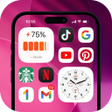
iOS-style launcher with integrated Control Center
Replaces Android home screen with an iOS-like launcher, an integrated Control Center, and a consolidated Notification Center in one package. OS 27 Launcher: Control Center, from ONYX CORE, bundles a home-screen replacement, control toggles, and a smart App Library into a single personalization app. It highlights smooth animations, gesture navigation, and automatic app categorization, aimed at Android users who want an iOS-style interface and reduced manual app sorting.
OS 27 Launcher replaces the standard Android grid with an iOS-style home screen that includes a dock and page dots, and it adds a dedicated Control Center accessed by swiping from the top-right corner. The app also consolidates notifications into a single list with swipe-to-dismiss, so the home screen, quick toggles, and notification stream come from one integrated package rather than separate utilities.
The launcher supplies customizable widgets for weather, clock, calendar, and battery, supports custom icon packs plus a built-in icon mask, and offers a Smart App Library that automatically groups installed apps into folders. You can hide apps behind a passcode, and a swipe-down gesture triggers global search for apps, contacts, and web results, giving both visual consistency and several organization tools without manual folder creation.
The developer states the app is designed to be lightweight with smooth animations that do not significantly impact system responsiveness. It combines launcher, lock screen, and control center into one app to avoid multiple background services, which reduces the chance of several persistent processes running simultaneously, and the inclusion of a built-in screen recorder and toggles keeps those features within the single app process.
Installation and use target personalization enthusiasts and former iPhone users: Control Center opens by swiping down from the top-right corner, notifications from the top-left, and hiding apps uses a dedicated Hide Apps feature with passcode protection. The app supports standard Android widgets alongside its iOS-style widgets, so existing widgets continue to work while the launcher delivers the new navigation gestures and layout.
OS 27 Launcher suits Android users who want an integrated iOS-style interface and gesture navigation without adding multiple background tools. It consolidates core desktop elements into one app, which keeps related controls in a single place; however, the design targets a niche audience that prefers iOS conventions, so expect a focused experience rather than a generic launcher replacement.
OS 27 Launcher: Control Center for Android
Free
Launcher for organized, utility-rich Android home screen

Free
Simplified Navigation with Big Launcher
Free
iOS-style launcher with Liquid Glass home screen
Free
Enhance Your Android Experience with Simple Launcher

Free
Sampler-style Android launcher with pads, knobs, and faders
Free
Context-aware Android launcher that adapts apps to modes