



3.7
Trial version
SRS Audio Sandbox
Advanced audio enhancement tool for personal computers
 MemorialApps
Safe & trusted downloads
The best software, verified by experts
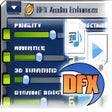
DFX sharpens Windows audio with system-wide DSP enhancements
Restores clarity and adds depth to compressed music and low-end laptop speakers using a system-wide audio engine and effects chain. DFX, from FXSound, runs across all Windows apps as a virtual soundcard and DSP. It offers a customizable 9/10-band equalizer, 3D surround, Hyperbass, and Dynamic Gain Boost for louder playback without clipping. You get preset libraries and a real-time spectrum analyzer, which suits music listeners, gamers, and anyone who wants clearer speech for transcription or calls.
The app enhances system audio by restoring lost fidelity and expanding spatial depth. It processes output from music players, browsers, and games at the system level, acting as a virtual soundcard and DSP. The processing chain targets compressed formats like MP3, using Fidelity and Ambience components to recreate high-frequency harmonics and add perceived space, while Hyperbass deepens low frequencies and Dynamic Boost raises loudness without causing clipping.
The tool supports any audio source on Windows without extra codecs. Because it operates system-wide, you can play MKV, MP4, MP3, or streaming audio and have the same processing applied. The developer lists compatibility with Windows 7 through 11, and the real-time spectrum analyzer gives visual feedback across frequency bands so you can judge processing effects on different files and playback scenarios.
The app covers quick improvements and detailed tuning for different experience levels. Preset libraries provide one-click profiles for music, movies, and gaming so you can start immediately. Advanced users can adjust the 9-band or 10-band equalizer and tweak Ambience, 3D Surround, and Dynamic Boost for fine control. The minimalist dashboard reduces clutter, while real-time visualization helps you make targeted adjustments during listening sessions.
DFX is a practical entry point if you want perceptible improvements from existing speakers or headphones without new hardware. The trade-off is that it applies real-time processing to every audio stream, so you accept system-level alteration rather than source-level mastering. If you want clearer, louder playback and hands-on equalization, the app provides a direct way to get there.
DFX for Windows
Trial version
Advanced audio enhancement tool for personal computers

Free
Seriously boost your audio quality free trial

Free
Free and dvanced volume controller for Windows systems
Trial version
Boost your PC volume above its maximum

Free
System-wide audio equalizer for PC

Trial version
Boost your audio with this plug-in app

Free mixing program

Free audio and MP3 converter to convert audio, music, MP3 and many other formats

A free music editor for OS X, Windows and Linux

The Digital Audio Player That Packs Them All

Record any audio directly from your sound card
A Trial version Home & hobby program for Windows

Cut or edit MP3 files without converting to WAV
Free audio software for DJs

Useful Audio Conversion Bundle for Personal Computers
Free Software for Vocalists

Converter flash file(.swf) to mp3 format file.
Any Audio Grabber