




4.7
Free
AI Car Designer Modify Tune
Revolutionize Your Car Customization Experience
 MemorialApps
Safe & trusted downloads
The best software, verified by experts

CarNova: AI-driven car visualizer for tuners and enthusiasts
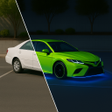
CarNova - AI Car Customizer from Mobile Smart Growth is an Android studio for visual vehicle design and tuning. It lets users upload a photo or pick an in-app model, then apply AI-driven edits that change paint, wheels, body kits, and stance while keeping the original scene intact. The tool offers high-resolution renders, curated style templates, and text-to-build generation for concept work. It targets car enthusiasts, tuning pros, and DIY owners who need realistic previews before physical modification.
The workflow is straightforward: upload a clear photo or choose a vehicle from the in-app garage, select a template or tweak components, then tap Generate to produce the modified image. The app uses an AI inpainting engine to isolate the vehicle and apply edits to paint, wheels, body panels, and suspension without editing the original background. This hybrid photo-plus-text input supports both quick templates and manual component adjustments.
CarNova produces high-resolution renders up to 8K, so it performs best on modern processors capable of high-resolution image rendering. The developer notes optimal performance on newer Android devices, which implies heavier CPU and GPU use during generation. Casual previews at lower resolution reduce device load, while full-resolution renders demand recent hardware and may take longer on older phones.
The app's background-safe inpainting specifically targets the vehicle and preserves the photo's original lighting and reflections, so the surrounding scenery remains unchanged. That behavior reduces the risk of unintended edits to the scene geometry. Users who require source-file integrity should still keep originals, since the app produces new rendered outputs while leaving the visible background intact.
CarNova supports two usage levels: template-driven edits for quick concepting and precision component tuning for detailed work. Casual users can apply style templates for fast previews, while experienced tuners can adjust individual parts such as spoilers, fenders, and suspension to fine-tune a build. The text-to-build mode allows creative prompts, but precise component work benefits from some familiarity with tuning terminology.
CarNova suits enthusiasts and tuning professionals who need realistic visual previews and concept generation on Android, provided the device has a modern processor. For heavy 8K renders, schedule generation during idle periods to avoid interrupting other tasks. Given its background-safe edits and hybrid input modes, CarNova is a practical choice for planning aesthetic modifications. Recommended.
CarNova - AI Car Customizer for Android
Free
Revolutionize Your Car Customization Experience

Free
Gyra AI - Transform Your Photos Effortlessly

Free
A free program for Android, by B.Creation株式会社.

Free
A free program for Android, by India Daily Network.

Free
Unlock Your Creativity with PromptSher AI

Free
Transform Your Photos with DreamCove AI