

4.7
Free
aaad Carstream Android
aaad Carstream Android: Stream and Mirror Effortlessly
 MemorialApps
Safe & trusted downloads
The best software, verified by experts
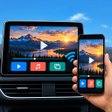
Car Cast turns an Android phone into a car infotainment media hub
Plays local videos and streams playlists on a vehicle display using Miracast, MirrorLink, or a wired video link, with direct install support for Android Automotive OS. Syscraft Labs builds the app for drivers and passengers who need in-car playback during stops or EV charging sessions. Key capabilities include local file playback, M3U/M3U8/Xtream playlist support, and Jellyfin or Emby library access, making it suited to owners whose vehicles accept mobile mirroring or external video input.
Car Cast : Car TV Player combines screen mirroring and a dedicated media player to send content from an Android device to a dashboard display. It supports Miracast and MirrorLink for wireless mirroring and reads M3U, M3U8, and Xtream playlists for streamed channels. The app also connects to Jellyfin and Emby servers so a remote media library appears alongside local video files on the car display.
The quality the app delivers depends on the vehicle hardware and chosen link: wireless mirroring runs over Miracast or MirrorLink, while wired output uses USB-C to HDMI or similar physical video inputs. The source notes that video output is high quality but that performance can vary by head unit, which matches reports that some vehicles handle the app’s playback better than others.
The app targets drivers and passengers who want entertainment while parked, such as during charging stops or long breaks, and it installs on Android Automotive OS where supported. The developer states the app is designed for stationary use, and DRM-protected services may not mirror correctly depending on the hardware and connection method, so users must ensure their use complies with platform terms and local rules.
The app is a capable option for Android owners who need a single app to play local video, playlist streams, and server libraries on a car display; its strengths depend on the car’s mirroring or video-input capabilities. Expect good results when the vehicle supports Miracast, MirrorLink, or a direct video input, and accept that DRM-protected content and some head units can limit playback.
Car Cast : Car TV Player for Android
Free
aaad Carstream Android: Stream and Mirror Effortlessly
Free
My TV Cast - Chromecast Streamer Screen Mirror Review

Free
Mirror Link: Auto Screen Cast brings Android screens to car displays

Free
A free app for Android, by Funny Apps Zone.
Free
Effortless Media Casting with tranScreen-TV
Free
A free app for Android, by IT Umme Developer.