



4.7
Free
AR Drawing: Sketch Art Trace
AR Drawing: Sketch Art Trace
 MemorialApps
Safe & trusted downloads
The best software, verified by experts
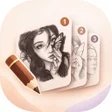
Phone-based AR tracing that guides step-by-step sketching practice
Project sketches onto paper with guided, step-by-step overlays using your phone camera as a virtual projector, helping users trace proportions and lines precisely. Artscrew - Drawing steps AR, from Artscrew studio, combines AR tracing, an extensive template library, and custom image import to teach sketching across genres. The app targets aspiring artists and hobbyists who want hands-on practice with visual guidance, and it includes controls such as image transparency and a flashlight toggle to aid real-world tracing sessions.
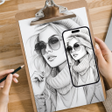
The app projects digital outlines over a live camera feed so you can trace directly onto paper, using the camera for alignment and a built-in flashlight toggle for low-light visibility. AR tracing is the central mechanic: the projected image opacity is adjustable, letting you balance the visibility of the overlay and your pencil marks. This approach is practical for short practice sessions at a desk or kitchen table where aligning the phone over the paper is feasible.
Structured lessons walk through drawing stages from base shapes to detailing, and the template library includes genres like anime and animals. Users can also import personal photos and convert them into traceable outlines, so practice can use familiar subjects. Lessons proceed in discrete steps, which helps learners focus on proportions before adding final lines, and the template variety supports repeated practice without remixing external resources.
The app runs on Android and requires camera access for its AR function, which must be granted during setup. The developer offers the tool as a mobile, hands-on tutor that operates locally with on-device projection of outlines; users should plan a stable phone mount and clear workspace for consistent results. Accessibility depends on physical handling: steady placement and a readable projected image are necessary for reliable tracing.
To sum up, Artscrew is a good option for beginners and hobbyists who want guided, tactile drawing practice using their phone as a projector; it supports stepwise skill building and custom image tracing. If you need consistent alignment, mount the phone on a stand and use a fixed light source. The app suits anyone looking for repeated, focused tracing sessions rather than freehand-only practice.
Artscrew - Drawing steps AR for Android
Free
AR Drawing: Sketch Art Trace

Free
Innovative AR Drawing App for All Artists
Free
AR Drawing: Sketch & Craft Review

Free
Unleash Your Creativity with AR Drawing: Sketch & Paint
Free
AR Drawing App: Paint Sketch

Free
AR tracing app for hands-on sketching and paper practice