





2.8
Trial version
LonelyScreen for Mac
Turn your Mac/PC into an AirPlay Receiver
 MemorialApps
Safe & trusted downloads
The best software, verified by experts
AirPlay audio sync for VLC.
With AirVLC you can watch videos on your Mac and play the audio through AirPlay, in sync. AirPlay causes a delay in the audio, which normally makes videos unwatchable. AirVLC helps to overcome that by suggesting the right delay preset.
Mountain Lion supports streaming to a single AirPlay speaker out of the box. If you have multiple speakers or use Snow Leopard or Lion, AirVLC works great with apps like Porthole. This means you can watch a movie and have the audio play throughout your house!
AirVLC uses VLC. No need for a sub-par video player. AirVLC merely controls the awesome video player that you already know and love.
AirVLC works with local files and web videos. This means that you can watch any .avi, .mkv, .mp4 you have lying around, but it also works with YouTube links. Drag a link from your browser onto AirVLC and you’re done.
People who enjoy watching videos and play the audio through their AirPlay-powered sound system. Enabling them to take advantage of superior quality and multiple speaker setups.
AirVLC for Mac
Trial version
Turn your Mac/PC into an AirPlay Receiver

Free
Free High-Definition Digital Media Player

Free
Free Mac Program: 5KPlayer

Free
Stream various contents on TV devices with ease

Paid
A simple way to cast your Mac

Trial version
iSkysoft Video Converter

Stream Live Feeds with Webcams for Mac

iScrobbler: Stream Videos Effortlessly on Mac
Stream Music Effortlessly with RadioRocker

Radium: Comprehensive Streaming Video Solution for Mac

Easily record Shoutcast and Icecast streaming radio shows
Control Internet and AM/FM radio
AOL Radio: Streaming Music for Mac Users
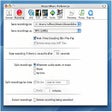
Record multiple audio streams in MP3, AAC y AIFF

Make simple screencasts

Watch news from the major French TV channels

Effortless Video Streaming with Xstreamripper